Basics
Coach Maker is part of the PlanCoach ecosystem. We turned coach creation into a standalone app so anyone can contribute ideas and expand the PlanCoach coach lineup.
So that every difficulty has a solution.
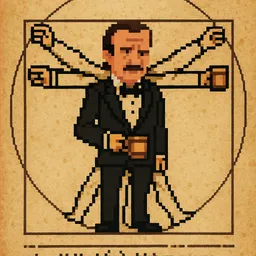
Pick a look. Give it a soul. Build the coach you wish existed.
Coach Maker is part of the PlanCoach ecosystem. We turned coach creation into a standalone app so anyone can contribute ideas and expand the PlanCoach coach lineup.
So that every difficulty has a solution.
The reason is simple:
In these edge cases, users need an expert, not an omnipotent generalist (which doesn't exist).
Bedtime procrastination needs a different approach from other stuck moments. For sleep, CBT-style guidance can slowly reduce stimulation and ease the anxiety of "I must fall asleep right now." For this specific case, we provide the "Chang'e" Sleep Guide Coach.
Some users respond better to a strict, high-pressure tone that triggers "fight or flight" and breaks decision paralysis. In that case, they need a very different sleep coach, not Chang'e.
To developers, these may look like edge cases. To the person living them, they are everyday life.
With Maker, anyone can create a specialist coach for these cases.
Search the App Store for "Coach Maker" to download.
+ icon in the top right corner
PlanCoach is integrated withVolcengine the industry's top-tier anthropomorphic voice large model. Through different voices, you can give the coach a unique personality charm.
When setting a voice for a coach, you can go to Volcengine's voice synthesis page, and in the"Online Synthesis Experience"area, listen and select the best matching voice; then fill in your chosen voice name (like "Cancan") into Maker.
There are two types of coaches:
For type 1, you just need to write "You are Lu Xun". Only type 2 requires a detailed specification of the character's personality, behavioral habits, etc.
If you want to fine-tune specific elements, you can restrict them in the prompt according to the following dictionary:
| Term | Explanation | Prompt Example |
|---|---|---|
user | Present the goal of the split steps, do not use "I" | “You must use your intelligence and emotional quotient to get the user to take the first step” |
opening_statement | Coach's opening prompt, will be displayed in the chat bubble | “opening_statement must not be mean” |
step | Title of each step | “The step should not exceed 5 words” |
emoji | Small icon for each step | “emoji cannot be repeated” |
hint | Hint for each step | “hint must be placed in parentheses” |
suggestion | Extra suggestion | “suggestion should quote a famous saying” |
celebrative_words | Congratulatory words | “Congratulate the user in celebrative_words” |
When the coach reads aloud (e.g., hands-free mode), the text inside the parentheses will be omitted. You can take full advantage of this to prevent the coach from reading hints aloud.
Click [Export] to send the coach package to others or use it yourself.
In the share interface, click PlanCoach to import directly into PlanCoach PlanCoach.
Maker A powerful feature of Maker is that you can generate a short and easy-to-remember secret code for the coach you created. Anyone anywhere on earth can use this code to install your coach into their PlanCoach.
Each shared secret code corresponds to a "snapshot" of a coach, which cannot be iterated or modified.
Reason: The use of snapshots is somewhat like chat stickers; once published, their information should remain unchanged from beginning to end.
The coach's code has a validity period. It cannot be downloaded after it expires.
Reason: Partly to control storage costs, and partly because we think internet memory should have an expiration date.
We hope Maker + PlanCoach can become a co-creation community where people keep improving shared work.
Maker's terms allow you to edit and improve coaches published by others. That also means the coaches you publish can be improved and remixed by others.
This is also somewhat like chat stickers. Once published, it has its own life cycle. Content with strong vitality will spawn branches and be continuously used.
It is also an inner incentive for the original author.
Click Import Coach in Maker, enter the code to download it locally.
Then you can edit and republish it in the usual way.
A pixel art sprite sheet of a handsome male. He looks fancy and charming.
Wearing a suit.
Age: 22.
Profession: Basketball Player.

Style: Stardew Valley. Pixel Art.
Palette: 16 colors strictly.
Background: Solid Magenta (#FF00FF).

***CRITICAL CHARACTER DESIGN***
- Reference: [Image or famous character]
- Perspective: Side view / Game view.
- Face to the camera.
- Full body. NO cropping.

***CHECK LIST***
- Do NOT add any text to the image.

***LAYOUT & GRID CONSTRAINTS***
- Canvas: 120 pixels wide x 80 pixels high.
- Grid: Strict 1 Rows x 3 Columns.
- Cell Size: Each sprite fits exactly in a 40x80 pixel box.

***DIRECTION RULE: ALWAYS FACE RIGHT***
- In ALL rows, the figure must face to the RIGHT (East).

***SPRITE SHEET***
- [0]: Stand.Idle : Idle Stance.
- [1]: Stand.Reading : Similar to Stand.Idle, but reading a paper note.
- [2]: Stand.Celebrating: Similar to Stand.Idle, with a thumbs up and a smile. Looking at the camera.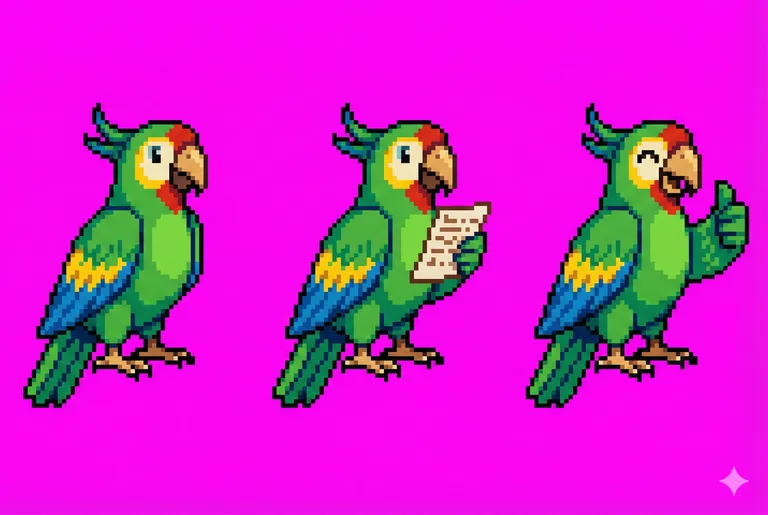
You need to generate it a few times. Usually, 3-5 times will yield a usable one. If it's not usable, you need to readjust the prompt.
Providing AI with a reference image yields much higher quality than having AI generate out of thin air.
You need to discover the character's traits. For example, the "Mage" coach included in the App doesn't give a thumbs up, but tips his hat. The God of Cookery holds up a sign.
When you put your heart into it, users will always notice.